


Tekmetric Mobile
3.144.00 Reviews
App Specs
- Version
- 1.40.0
- Updated On
- License
- Free
- Downloads
- 10,000+
- Developer
- Tekmetric
- Categories
- Auto & Vehicles
- Platform
- Android
Screenshots
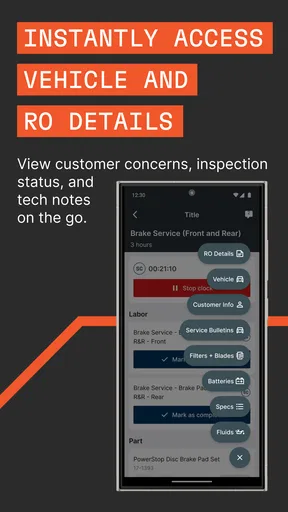
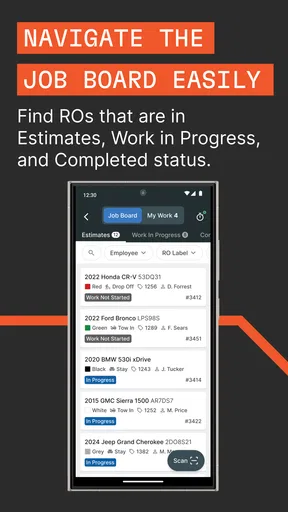
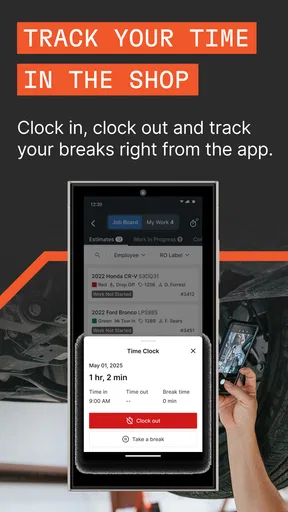
 Analysis by AppCompare
When a repair shop depends on quick handoffs, a phone can be more useful than a computer sitting behind the counter. That is the idea I found in Tekmetric Mobile, an Auto & Vehicles app from Tekmetric that brings selected shop-floor tasks to a mobile screen. I used it with a simple question in mind: does it genuinely help a team move around the shop, or does it merely squeeze desktop work into a smaller display?
My answer is fairly positive, with an important boundary. This is not a general car-maintenance app for drivers, and it is not a household budgeting tool for tracking fuel or repairs. It is aimed at people working inside an automotive service business, particularly those who need to greet customers, begin repair orders, and carry out inspections without staying at a fixed workstation. That focus makes it more practical for the right user, but much less relevant for everyone else.
The app is free, carries an Everyone content rating, and has reached over ten thousand installs. Its average rating is 3.1 from around seventy ratings, so the public response looks mixed rather than universally enthusiastic. I would treat that as a reason to test it in your own shop workflow instead of assuming it will suit every team immediately.
Using a phone when several people share the work
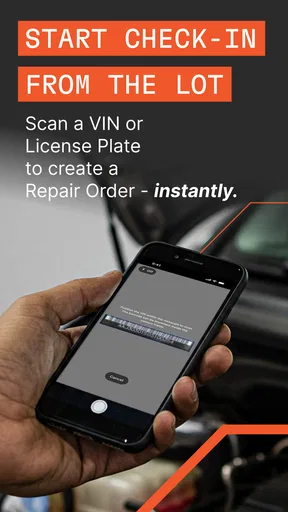
The clearest use case is a shared repair-shop environment. Imagine a customer arriving while the service adviser is away from the desk, walking toward a vehicle or checking another job. With Tekmetric Mobile available on the phone, the adviser can start the customer-facing process without first returning to a computer. That small change matters because the first few minutes of a visit often involve confirming the vehicle, understanding the concern, and deciding what needs to happen next.
I also see value for a technician or inspection-focused staff member who does not want to keep moving between a vehicle bay and a front counter. A phone is easier to carry than a workstation, and that makes the app feel naturally suited to work that happens beside the car. The store summary highlights greeting customers, starting repair orders, and performing inspections, and those tasks fit together as a mobile sequence rather than as unrelated buttons.
In a real everyday scenario, a customer could arrive with a warning light concern while the adviser is already helping another person. A second team member could greet the new arrival, open the repair-order process from the phone, and keep the handoff moving. Later, an inspection could be performed near the vehicle instead of relying on memory while walking back to the office. I would still expect the shop to review the information before final decisions are made, but the mobile step can reduce unnecessary back-and-forth.
The shared-device angle needs more care. A shop phone passed between employees is convenient, but it can also blur responsibility. The person holding the device may be the one entering information, while another person later assumes it was checked. My practical advice is to treat the phone as a work tool with a clear owner during each task. Hand it over deliberately, say what has already been completed, and avoid leaving an active session unattended in a public area.
Worth Reading Before You Choose

EA SPORTS FC Mobile 26 Is a Bigger Football Game, but It Takes Time

Flipboard Shows What News Apps Must Do Beyond the Feed

Switching to Android Auto Means Rethinking Your Driving Routine

Google Calendar Makes a Crowded Week Easier to Manage

Ludo King Makes the Most of the Minutes Between Plans

Baby Panda World Brings Quick Play to Modern Phones, but Its Game Library Feels Busy
This is one of the less obvious trade-offs of mobile service software: portability improves coordination, but portability also makes informal habits easier. A desktop station naturally signals where work begins and ends. A phone does not. Teams using this app should agree on who starts a repair order, who performs the inspection, and who gives the customer the next update. The software can support that flow, but it cannot replace the shop’s own handoff discipline.
What the first setup should establish
I would not begin by handing the phone to everyone and telling them to explore. The better approach is to define the work boundary first. Decide which employees need mobile access, which tasks they are expected to perform, and when a job must return to the main office workflow. That is especially important for a small shop where one person may greet customers, inspect vehicles, and handle administrative work during the same shift.
Tekmetric Mobile is developed by Tekmetric, so I would expect it to make the most sense for a business already organizing its repair work around Tekmetric’s service environment. I would not choose it as a standalone app simply because the idea of mobile inspections sounds useful. Before deployment, I would confirm that the shop’s existing process matches the app’s role and that employees understand where mobile work fits with the rest of the business system.
For a first trial, I would use one shop phone and one or two experienced employees. Start with a low-risk repair order, follow it from customer greeting through inspection, and note every moment when someone has to stop and find a computer. This reveals more than a quick glance at the interface. It also shows whether the app actually reduces interruptions or merely moves them to a different part of the process.
Account boundaries deserve attention even in a small workplace. A personal phone and a shared shop phone should not be treated as interchangeable. If an employee uses a personal device, the shop should decide who is responsible for keeping it secure and whether that arrangement is appropriate for customer and vehicle information. If a shared device is used, the team should establish a simple sign-in and sign-out habit, especially at shift changes.
I would also avoid assuming that every employee should see or change everything. The app’s purpose is mobile access to specific repair-shop activities, not an excuse to give every person unlimited control over the entire operation. Even without inventing particular permission settings, the principle is useful: assign responsibility by role, keep access purposeful, and review the process when staff members join or leave.
The current version is 1.40.0, and the minimum operating system is Android 7.0. That makes the app potentially usable on older Android phones, which may help a shop repurpose an existing device instead of buying new hardware. Still, an old phone can have a tired battery, a dim screen, or unreliable performance. Compatibility on paper does not guarantee a comfortable experience beside a vehicle, so I would test the actual device that employees will carry.
Coordination between the counter, bay, and customer
The strongest reason to use this app is coordination. A repair order is not just a form; it is a chain of small decisions. Someone receives the customer, someone records the concern, someone inspects the vehicle, and someone explains what happens next. A mobile tool has value when it keeps those steps connected while people move through different parts of the shop.
In my view, the phone should be used as a bridge, not as the only source of truth in a rushed conversation. When a customer describes a problem, the employee should listen first and enter information carefully rather than tapping through a template while distracted. Once the initial details are captured, the device can help the team continue the process without requiring the customer to repeat the same story to several people.
A useful team habit would be to narrate the handoff: “The customer is checked in, the concern is recorded, and the vehicle is ready for inspection.” That sounds basic, but it prevents a common mobile-work problem where everyone assumes someone else finished the previous step. I would pair the app with short verbal confirmation, especially during busy periods or when several vehicles look similar.
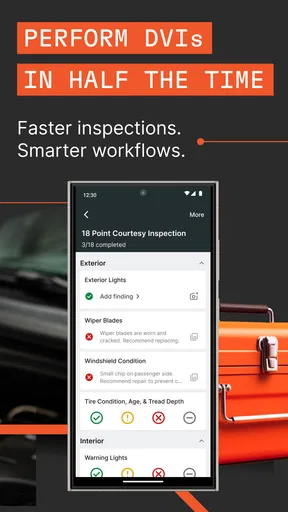
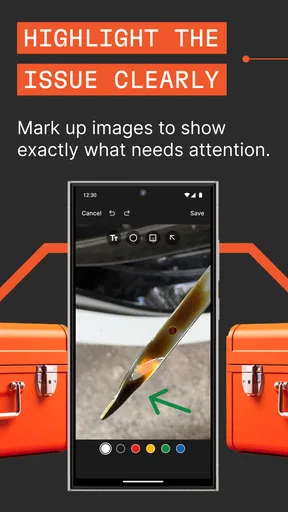
Inspections are another area where mobile access can change behavior. A technician can stay near the vehicle and work through the inspection rather than making notes on paper and entering them later. The advantage is not simply speed. It can reduce the gap between what was observed and what is eventually recorded. The trade-off is that a phone screen may be awkward when hands are dirty, lighting is poor, or the employee needs to compare a physical component with an on-screen item.
For that reason, I would not force every inspection into the same rhythm. A quick visual check may be comfortable on the phone, while a more involved diagnosis may require a different process and more time at a workstation. The app is most convincing when it removes needless walking, not when it is used to make every part of a complicated repair fit a mobile screen.
Customer communication also needs a human layer. A phone can help an employee stay organized, but it should not become a barrier between the adviser and the person standing at the counter. I would enter the essential information, look up, confirm the concern in plain language, and then continue. That balance is particularly important for customers who are anxious about cost, safety, or how long a repair may take.
Age, trust, and responsible use
The Everyone rating tells me that the app is not presented as age-restricted entertainment or as an adult-only product. In a household context, however, that does not mean it is intended for children. Its actual purpose is professional automotive work, and the sensible users are adults or trusted staff members who understand customer service and vehicle inspections.
If a family owns a repair business, a shared phone may be used by relatives of different ages. I would keep the boundary clear: younger family members should not be given the device merely because the rating permits it. They may be curious, but greeting customers and recording repair information involve trust, accuracy, and responsibility. The age label describes content suitability; it does not assign workplace authority.
This distinction matters when a household shares devices. A child using the same phone for games or videos could accidentally interrupt a work session, change the device state, or make it difficult to know who last handled the account. A dedicated shop phone is the cleaner arrangement. If that is not practical, the family should agree on when the device is for business and when it is for personal use.
I would also explain to every user that a mobile repair record deserves the same care as a paper form or desktop entry. Do not leave the phone where customers can pick it up. Do not let a casual helper enter details without supervision. Do not treat a completed inspection as finished until the responsible employee has checked it. These are workflow safeguards, not features I am claiming the app provides.
Trust is especially important when a team shares one login or one device. Even if that arrangement feels efficient, it can make mistakes harder to trace. My preferred approach is to give each employee a clear task and a clear moment of responsibility. If the shop’s existing account structure cannot support that comfortably, I would pause before expanding mobile use and first clarify the internal process.
Where it fits beside the usual alternatives
The usual alternative is a fixed computer at the service counter, often combined with paper inspection sheets or handwritten notes in the bay. That arrangement is familiar and easy to supervise, but it forces employees to walk, wait, and re-enter information. Tekmetric Mobile is more appealing when the shop loses time to those repeated trips or when customer greetings happen away from the desk.
Paper still has a few practical strengths. It works when a device battery is low, when a screen is difficult to use with gloves, or when several people need to look at the same page at once. It is also simple for a temporary note, although paper creates its own risks when handwriting is unclear or forms are misplaced. I would not eliminate a sensible backup process just because mobile work is available.
A general notes app may seem like a cheaper substitute, but it lacks the clear connection to the repair-shop tasks that make this product relevant. Writing a concern in a generic note can be quick, yet it may leave the next employee guessing what the note means or where it belongs. The value here is not that a phone can display text; it is that the mobile workflow is designed around customer greetings, repair orders, and inspections.
On the other hand, a full desktop service-management setup may remain better for managers who need a broad overview, detailed administration, or a large screen for reviewing many jobs. I would not replace the main workstation with the phone. I see the mobile app as a companion for movement-heavy work, while the desktop remains more comfortable for extended review and office tasks.
That distinction helps answer an important question: who should skip it? A private car owner looking for maintenance reminders should skip it. A shop that rarely leaves the counter may gain little from mobile access. A team that does not have a consistent repair-order process should fix that process first. And a business that cannot decide who is responsible for shared-device entries may create more confusion than the app removes.
My household and shop verdict
After looking at the app through a shared-use lens, I think Tekmetric Mobile is most worthwhile for an automotive service team that needs to move between customers, vehicles, and the front desk. Its free price lowers the barrier to trying it, and the broad Everyone rating makes the app uncomplicated from a content perspective. The more important question is operational: does the shop have a clear reason to take repair-order and inspection work away from the counter?
The public average of 3.1 suggests that expectations should stay realistic. I would not install it and promise an instant transformation. I would test it with a real vehicle, a real customer handoff, and the actual Android phone the team plans to use. Pay attention to screen visibility, typing comfort, battery condition, and whether employees understand who owns each step.
My favorite potential benefit is not any single tap. It is the reduction of small interruptions: walking back to the desk to start a job, returning again to record an inspection, or asking a customer to repeat information because the first handoff was incomplete. Those minutes add up in a busy shop, and a mobile workflow can make the team feel more present and coordinated.
My biggest caution is equally practical. A shared phone can make work faster only when the people sharing it communicate well. Without role boundaries, careful handoffs, and a final review of important entries, convenience can turn into uncertainty. I would introduce the app as part of a simple team routine rather than as a magic replacement for good service habits.
For the right repair business, I would recommend trying Tekmetric Mobile as a focused companion to the existing Tekmetric workflow. It is not the right choice for household car owners or teams expecting a complete office system in their pocket. But when the goal is to greet a customer away from the desk, begin the repair process, and keep inspections closer to the vehicle, mobile access can be genuinely useful—provided the shop treats account access, age, trust, and responsibility as seriously as the repairs themselves.
Pros
- Quick access to repair orders
- customer details
- and vehicle information.
- Push notifications help technicians and shops track important updates.
- Mobile inspections make it easier to document vehicle conditions on-site.
- Cloud-based data keeps shop information available across supported devices.
- Useful for improving communication between service advisors and technicians.
Cons
- Some features may require an active Tekmetric shop subscription.
- The app is less useful for customers without access to a participating shop.
- A stable internet connection is needed for reliable syncing and updates.
- The interface can feel crowded when managing multiple repair orders.
- Advanced shop-management tasks may still be easier on the desktop version.
FAQs for Tekmetric Mobile
What is Tekmetric Mobile used for?
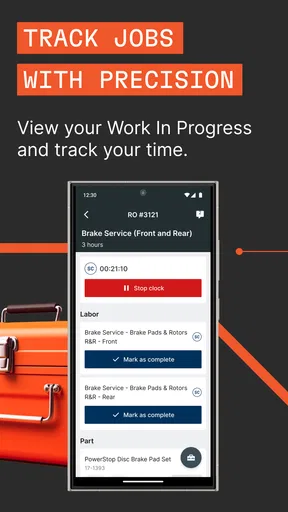
Tekmetric Mobile is a companion application for automotive repair shops that use the Tekmetric management platform. It is designed to help shop owners, managers, service advisors, and technicians stay connected with daily operations away from a desktop computer. Depending on the user’s permissions, the app may provide access to repair orders, customer and vehicle information, appointments, inspections, messages, and other shop-management details.
Can anyone create an account and use Tekmetric Mobile?
No. Tekmetric Mobile is generally intended for users whose automotive repair business already uses Tekmetric’s shop management software. Access normally depends on an existing shop account and an invitation or login created by an administrator. The features available after signing in can also vary according to your role and permissions, so a technician, service advisor, and shop owner may see different tools within the application.
What information can I manage from the mobile app?
The exact tools can depend on your subscription, account setup, and assigned permissions, but Tekmetric Mobile is built to provide convenient access to important shop information. Users may be able to review appointments, customer records, vehicle details, repair orders, inspection results, internal communication, and workflow updates. It is especially useful for checking progress and responding to shop activity without remaining at a workstation.
Does Tekmetric Mobile work without an internet connection?
Tekmetric Mobile is primarily a cloud-connected application, so an active internet connection is normally required to sign in, retrieve current records, and synchronize updates with the shop’s Tekmetric account. If your connection is weak or unavailable, information may load slowly or certain actions may not work. For the most reliable experience, use a stable Wi-Fi or mobile-data connection and keep the app updated.
Is Tekmetric Mobile free to download and use?
The application may be available to download without a separate upfront charge, but access to its business features is generally connected to a paid Tekmetric shop-management account or subscription. In other words, downloading the app does not necessarily provide independent access for personal use. Before installing it, confirm that your repair shop has an active Tekmetric account and ask an administrator about login requirements and possible service costs.


